
Autopilot in selected panoramic cameras
Summary
Autopilot is a feature that provides active video surveillance on a multidirectional camera that is used in combination with a PTZ camera. A moving object of interest can be detected in any direction through the fixed camera heads of the multidirectional camera, after which the PTZ camera automatically redirects to zoom and track the object.
This combination of 360° object detection and PTZ commands provides both a general overview and detailed views of any incidents.
Autopilot is included in AXIS Object Analytics in AXIS Q6300-E Panoramic Camera and AXIS Q6020-E Panoramic Camera. You can use autopilot if you’re using one of the following combinations:
AXIS Q6300-E Panoramic Camera with a PTZ camera from AXIS Q61/Q63/P56 PTZ Camera Series
AXIS Q6020-E Panoramic Camera with a PTZ camera from AXIS Q60 PTZ Camera Series
By automating PTZ control, autopilot reduces operator workload and enables a quick shift from general monitoring to detailed observation. This improves situational awareness and enhances use cases such as recognition or identification of individuals and license plates.
Introduction
Autopilot provides active video surveillance on AXIS Q6300-E Panoramic Camera and AXIS Q6020-E Panoramic Camera by directing a compatible, attached PTZ camera toward moving objects detected by the panoramic camera.
In cases where recognition or identification of objects is required — such as verifying a person’s identity or reading a vehicle’s license plate — the panoramic camera might not provide sufficient detail. In these cases, autopilot ensures that the PTZ camera automatically delivers a closer look and tracks the object.
This white paper describes how the autopilot feature works and its settings, action rules, and limitations.
Combining 360° object detection with automatic PTZ tracking
AXIS Q6300-E Panoramic Camera and AXIS Q6020-E Panoramic Camera are multidirectional cameras with four camera heads each. The cameras deliver 360° overviews with object detection. But these cameras are also specially designed for combined operation with cameras from AXIS Q61/Q63/P56 PTZ Camera Series and AXIS Q60 PTZ Camera Series, respectively. With the combination, you can capture high-resolution overviews and detailed views of any incidents in one complete camera solution.
The autopilot feature enables automatic PTZ tracking. It monitors an area of interest from the multidirectional camera and uses the PTZ camera to track persons, vehicles, or other moving objects of interest.
The objects of interest can be categorized, and certain types can be excluded. Specific areas or directions can be given higher priority. Autopilot can also trigger actions, such as alerting security staff, starting video recordings, or playing audio clips through speakers.
Setting up autopilot
Autopilot is included in AXIS Object Analytics. You access autopilot in the panoramic camera’s web interface under Analytics > AXIS Object Analytics > Autopilot. For more information about AXIS Object Analytics, see the panoramic camera’s user manual.
Enable autopilot by creating a scenario
Autopilot is off by default. To enable it, start AXIS Object Analytics and create at least one scenario. You have two scenarios to choose from:
Object in area – Autopilot. This recommended scenario is based on object detection and can categorize objects of interest.
Motion in area – Autopilot. Based on video motion detection, this scenario can’t categorize objects.
To ensure complete coverage of the visible area you must create one scenario for each of the four sensors in the panoramic camera.
Assign priority
You can assign a priority within each scenario. When objects are detected in a higher-priority scenario, such as a gate or other area of special interest, autopilot will prioritize them over lower-priority scenarios.
Calibrate autopilot
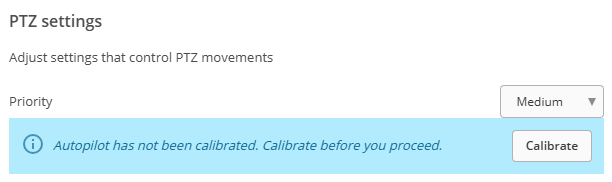
You need to calibrate autopilot before first use. You can do this easily within the scenario.
Activate autopilot and update tracking options
In AXIS Object Analytics > Settings you can:
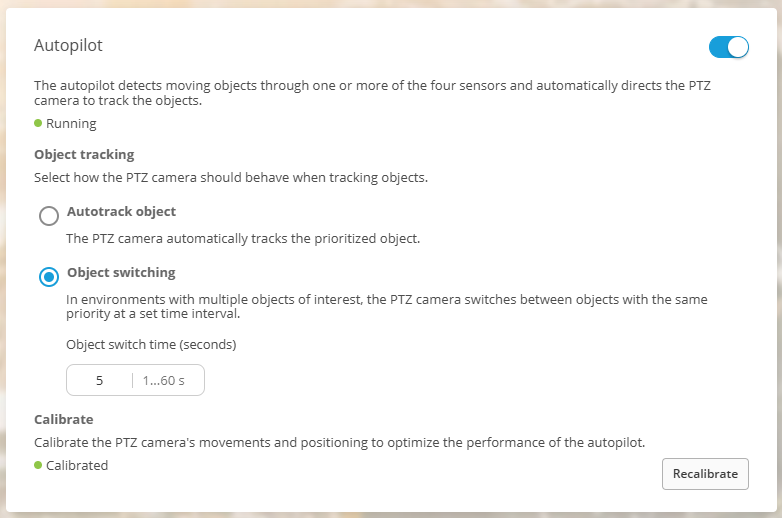
turn autopilot on and off
configure the tracking behavior of the PTZ camera in case of multiple detected objects
adjust the object switch time: the time interval at which the PTZ camera switches between objects.
Object tracking
Autopilot tracks detected objects by mapping them into a coordinate system with pan and tilt angles. Each object is assigned three properties: pan, tilt, and size.
Objects that are close enough to each other to fit within the PTZ camera’s field of view are grouped together. Each group is assigned pan, tilt, and zoom properties, which are used when the PTZ camera is tracking it. Autopilot continues tracking the same group as long as the group exists. If Object switching is activated, autopilot will switch to a new object (if any exists) as soon as the configured Object switch time has elapsed.
Zoom
Autopilot zooms in on detected objects or groups of objects. When objects move, or when two or more objects move away from each other, autopilot can zoom out to avoid losing them from the picture. Autopilot also adjusts the zoom to keep the objects at a suitable size related to the total size of the image.
Action rules
You can use autopilot to trigger various actions. When autopilot starts or stops tracking an object, it generates the event Autopilot tracking. This event can be used as a trigger to:
start a recording
create a bookmark
generate a log entry in a VMS.
These integrations ensure that important events are documented and easily accessible for later review.
You can also use action rules to turn autopilot on. For example, a schedule could enable the action Turn on autopilot outside office hours when a supervised area is expected to be empty.
Directional audio detection
Autopilot works in conjunction with directional audio detection, which has higher priority. If the directional audio detection feature detects a sound while autopilot is tracking an object, autopilot will pause and the PTZ camera will redirect toward the detected sound. After the redirect, autopilot will resume from the new position and track the object that produced the sound, if that object is visible.
Compatibility
Autopilot is compatible with all PTZ cameras that AXIS Q6300-E Panoramic Camera or AXIS Q6020-E Panoramic Camera is compatible with.
Limitations
As with all detectors, there are circumstances where autopilot performs less well. Understanding the limitations can help set the right expectations so you can design your system accordingly.
There are some known limitations:
False detections. Autopilot relies on video object detection or video motion detection, which can be affected by poor lighting conditions, shadows, or moving elements such as flags, trees and other vegetation. These can cause false detections, leading autopilot to track objects that don’t exist.
Fast-moving objects. Very fast objects can be difficult to track accurately.
High object density. A scene with a large number of detected moving objects can be a challenge. Autopilot doesn’t include any built-in function for sequentially viewing all detected objects.
The minimum object size in the panoramic camera’s views also affects the performance of autopilot. This size is set by AXIS Object Analytics. We recommend at least 8% of the total image height for humans and 6% for vehicles, to make sure that autopilot can track them. At the other end of the scale, objects that are larger than 35° horizontally or 25° vertically are discarded.