
Portcast
Download PDFSummary
Axis devices, such as network cameras, are often installed without every capability a site might need, for example audio, extra input/output ports, or environmental sensing. Portcast is a technology that closes this gap. It lets you add functionality to a host device by connecting a portcast device between the host device and its power source, without requiring an additional license, IP address, or separate management interface.
A portcast device draws power from the existing PoE connection and communicates directly through the host device's web interface, so its functionality appears as if it were built into the host device from the start. You can scale your installation and add capabilities exactly where you need them, without the overhead of managing extra devices as separate network endpoints.
Examples of portcast devices include audio and I/O interface devices, a portcast-based air quality sensor, and connectivity midspans. They all let you extend a host device's capabilities to fit the needs of a specific site, from adding two-way audio to a camera, to placing an air quality sensor exactly where it's most useful.
Introduction
Portcast is a technology that lets you add functionality, such as audio, I/O ports, or environmental sensors, to your Axis devices. You don't need an extra license or IP address for the portcast device you connect. It simply expands what your Axis device can do, as if the added functionality was built in.
This white paper explains how portcast works and what it lets you do. We also look at some of the most common devices that use portcast, and how portcast compares to edge-to-edge, another way to extend device capabilities.
Portcast functionality
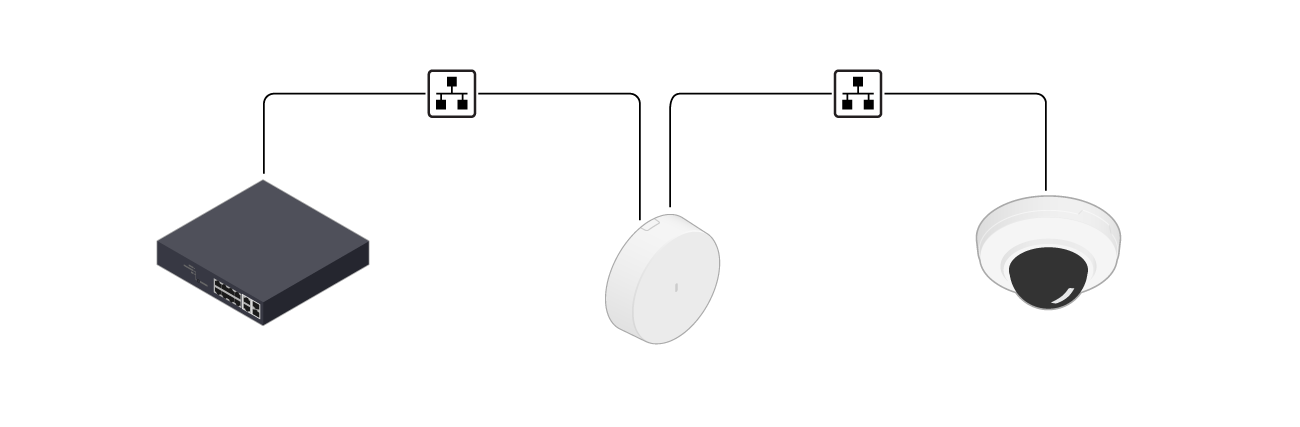
A portcast device connects between a host device and its power source, with the host device acting as a gateway. The portcast device draws power from the existing PoE connection between the host device and its power source, so it doesn't need an additional power supply.
The portcast device's functionality is added in the host device's web interface without any configuration or separate management interface. You control the added functionality through the host device's web interface.
Power distribution
Power is shared between the portcast device and the host device. For power-intensive host devices, you can use a midspan to supply additional power.
Portcast devices can support various PoE classes, depending on which specific host device needs they were designed to address. For example, an audio and I/O interface device can support both PoE class 3 and 4 and shares the power with the host device. A midspan with portcast functionality instead produces power and provides it to the host device.
If you connect a portcast device to a host device that has a power consumption near the maximum power level of its PoE class, the host device can turn some functionality off to ensure there's enough power for the system. IR functionality is typically the first to be affected. If IR is important in your installation, use a higher PoE class with enough power budget to cover all needs of the host device and the portcast device.
The maximum cable length between the power source and the host device is 100 m (328 ft), following the PoE protocol.
Network communication
Portcast adds a communication layer on top of the existing network connection between the host device and its power source. This layer lets the portcast device's functionality appear directly in the host device's stream and web interface, without a separate activation step.
LLDP (Link Layer Discovery Protocol) is used between the host device and the portcast device. The portcast protocol relies on the TCP/IP stack to perform its operations. The setup is designed so that the portcast device isn't visible to the outside network, and only the host device can interact with it. Communication uses IPv4 exclusively, so the host device needs a valid IPv4 address for communication to work.
Portcast use cases
Because a portcast device doesn't need its own configuration or network identity, you can extend the capabilities of the host device without the overhead of managing separate network endpoints. This makes it easier to scale your installation and add capabilities right where you need them.
Typically, you can add audio ports to a camera that doesn't already have them. With these audio ports, you can connect external audio devices, and their functionality is integrated into the host device.
Similarly, you can add input/output (I/O) ports so you can connect external devices such as motion sensors, door lock relays, and audio/visual alerters to trigger alarms or actions. If your camera doesn’t already have built-in I/O ports, a portcast device with I/O ports lets you add this functionality without extra configuration.
You can place a portcast-based sensor exactly where it's most useful, even if the host device is installed somewhere less accessible. For example, an air quality sensor with portcast can be placed at breathing height while the camera it connects to is mounted high on the ceiling for optimal video overview. Similarly, you can place a microphone closer to where people are.
Portcast devices
Axis offers a wide variety of portcast devices to extend capabilities. This section presents a few examples.
Audio and I/O interface device
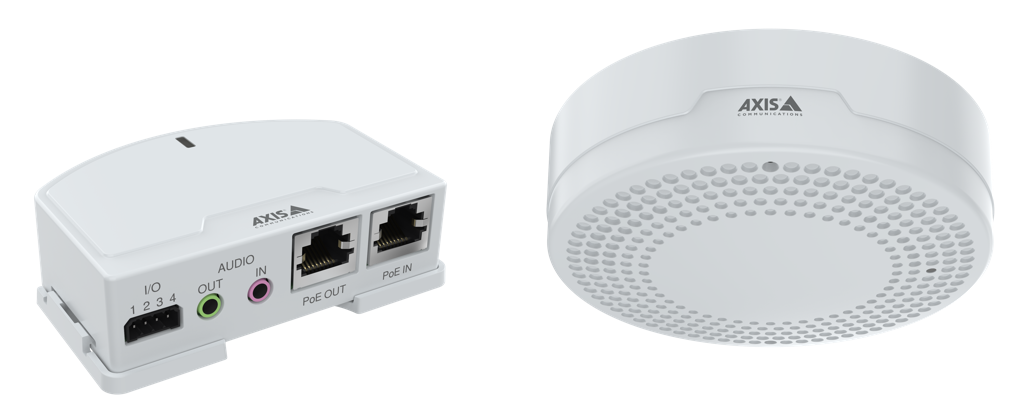
An audio and I/O interface device adds two-way audio ports and input/output ports to a host device, typically a camera. As a portcast device, it uses the camera’s IP address and power, and you control it from the camera's web interface. Audio and I/O data is transferred digitally over the network cable, together with video, in a single stream.
Axis audio and I/O interface devices come in two versions: with or without a built-in microphone.
Air quality sensor
A portcast-based air quality sensor adds indoor air quality measurement to a host device without requiring a separate IP address. You install it between an Axis host device, such as a camera, a strobe siren, or a standalone air quality sensor, and the power source.
You control the sensor from the host device's web interface. If the host device is a camera, measurement results are also available in the camera stream through MQTT overlays.

Connectivity midspan
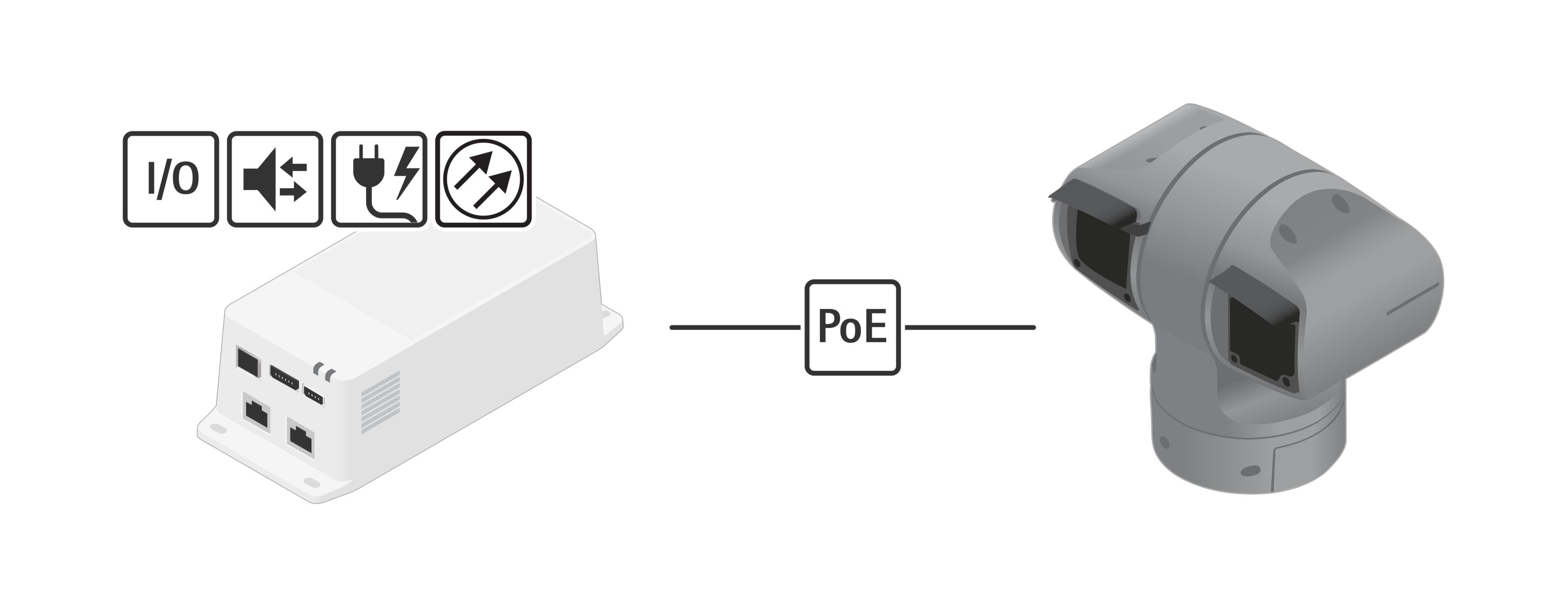
A connectivity midspan can power selected PTZ cameras. With portcast technology it also uses the camera’s IP address to provide seemingly camera-integrated audio and I/O connectivity. This enables audio and video in one stream over the network with no extra VMS license.
Portcast compared with edge-to-edge
Like portcast, edge-to-edge technology adds capabilities to Axis devices. When you pair devices using edge-to-edge, you control the added device in the web interface of the main device, as if the extra capabilities were built in.
But devices you add with edge-to-edge connect to the network with their own IP addresses and use their own PoE power budgets. Portcast devices share the IP address and power budget of the host device.
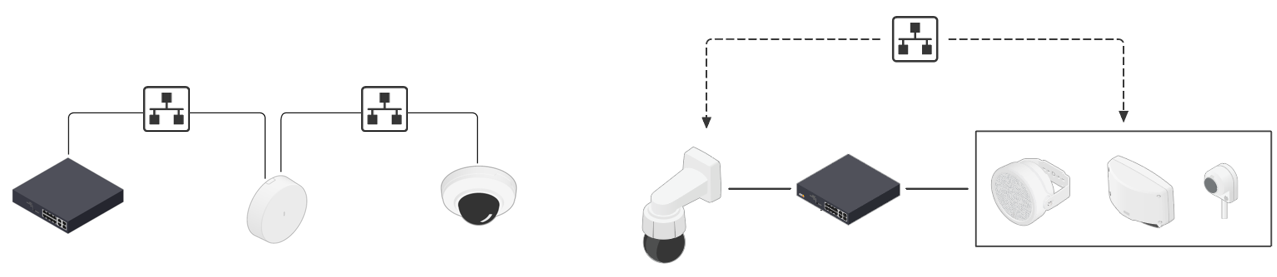
- Left: A portcast device sits between the network switch and the host device, sharing the host device’s IP address and power budget.
- Right: With edge-to-edge, the added devices are on the same network as the main device but use their own IP addresses and power budgets.