
Streaming performance for ARTPEC-9 products
Summary
The ARTPEC-9 chip makes the new generation of Axis video products even more powerful. There are different configurations of ARTPEC-9 to allow us to provide tailored performance levels across our product range.
The performance of a video product can be quantified by how many simultaneous streams (with given resolutions and frame rates) it can deliver. The overall streaming performance is dependent on many factors, including CPU load, bandwidth, and client performance.
Our measurements show that a typical Axis camera with ARTPEC-9 (extended configuration) can deliver one of the following:
one AV1/H.264/H.265 stream in 4K at 60 fps, or
two or three simultaneous AV1/H.264/H.265 streams in 4K at 30 fps, or
four simultaneous AV1/H.264/H.265 streams in HDTV 1080P at 60 fps, or
eight simultaneous AV1/H.264/H.265 streams in HDTV 1080P at 30 fps.
Introduction
At Axis, we develop our own integrated circuits. They provide our broad portfolio of video cameras and encoders with optimal video compression abilities, as well as superior imaging, opportunities for advanced analytics, and much more. Our latest SoC (system-on-chip) is ARTPEC-9.
This white paper presents measurement results for a systematic understanding of the performance, in terms of streams and frame rates, of Axis products based on ARTPEC-9. The paper is intended for technical personnel and system integrators. For product specifications, see instead the product datasheets — they are the official specification documents for Axis products.
Quantifying streaming performance
The performance of a video product can be measured by how many simultaneous streams (with given resolutions and frame rates) it can deliver. Each stream should be individually configured, meaning that the clients should not access cached data. A video product can, in general, deliver many more streams that have identical configurations, than individually configured streams.
Factors affecting streaming performance
It’s hard to predict exactly how many simultaneous, individually configured streams (with maximum resolution and full frame rate) a video product will deliver in all situations. The overall streaming performance depends on many factors, such as the following.
CPU load or video compression load in the video product
SoC configuration. ARTPEC-9 hardware comes in different designs, such as extended configuration and standard configuration. Axis chooses which design to use in each product in order to optimize product performance. It’s not possible to change this configuration in a finished product.
Total data throughput (bandwidth) from the product and network infrastructure
Client performance
From a user perspective, the following parameters are the most likely to affect the overall performance negatively.
High image resolution
Low image compression level
Mixing Motion JPEG and AV1/H.264/H.265 streams
A large number of clients accessing the server simultaneously
Clients requesting video streams with different image settings (such as resolution and compression) simultaneously
Heavy use of event settings
Analytics or other applications enabled on the camera
Encrypted transmission
Poorly performing client PC that doesn’t decode all images
Limited or poor network infrastructure. Frames will be dropped when network is congested.
There are also factors in the monitored scene that could affect the performance, such as the following.
The complexity of the image
The lighting conditions
Configurations of ARTPEC-9
We offer different configurations of our ARTPEC-9 chip to cater to diverse product needs, resolutions, and performance requirements. This approach ensures that each product delivers optimal performance for its specific use case.
For example, our top-of-the-line Q-line products are designed with higher-performing ARTPEC-9 configurations to support demanding applications like embedded analytics, additional streams, and larger and more advanced overlays. With more metal in the casing these configurations benefit from enhanced cooling, enabled by the physically larger product.
In summary, the varying ARTPEC-9 configurations allow us to provide tailored performance levels across our product range, ensuring that each product meets its intended use case effectively.
The AV1 codec
AV1 is a modern video encoding standard optimized for video transmission over the internet. AV1 was standardized in the Alliance for Open Media (AOM), which was founded by the world’s main IT companies, to create the next generation of video communication technology.
This standard is designed to provide high-quality video at lower bitrates compared to existing codecs like H.264 and H.265, making it ideal for streaming and storage applications.
The AV1 codec supports video resolutions wider than 8K, a capability otherwise primarily associated with H.265. Additionally, AV1 has decoding support in web browsers, operating systems, and mobile devices, ensuring that it’s easy to use.
Measurements and results
We’ve investigated the performance through measurements using the following setup.
Factory default values
Image complexity: realistic scene
Each stream was unique, meaning that the clients shouldn’t access cached data. The compression level varied from 30 to 39 (up to ten different streams) for AV1, H.264 and H.265.
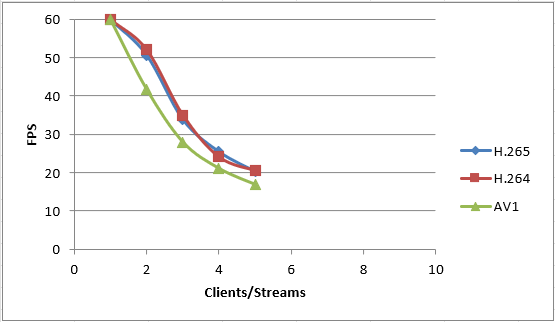
4K (3840x2160), max 60 fps, extended configuration
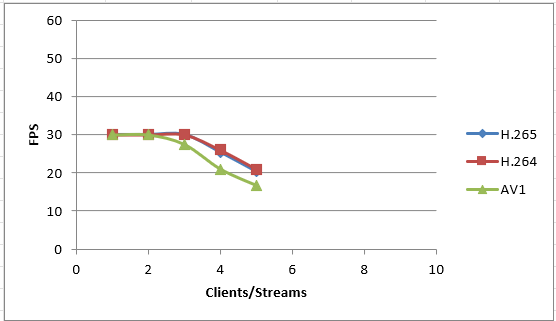
4K (3840x2160), max 30 fps, extended configuration
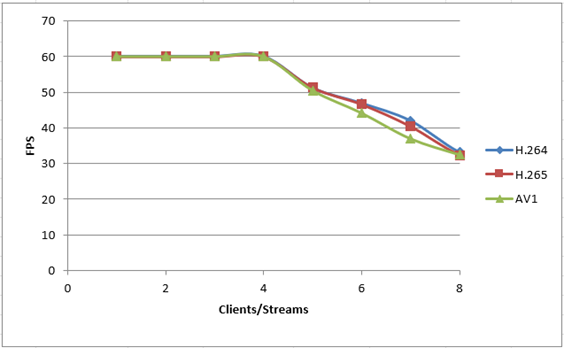
HDTV 1080P (1920x1080), max 60 fps, extended configuration
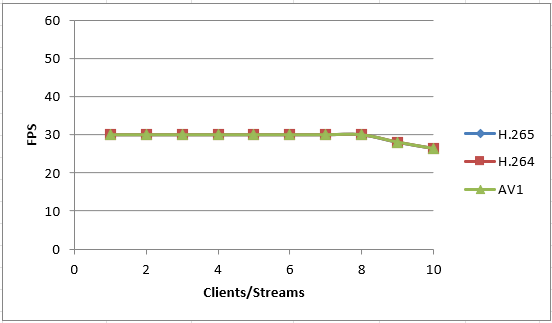
HDTV 1080P (1920x1080), max 30 fps, extended configuration
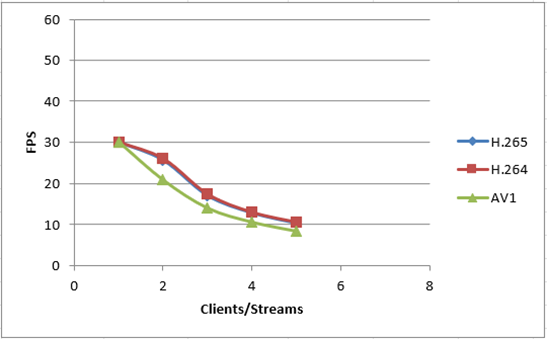
4K (3840x2160), max 30 fps, standard configuration
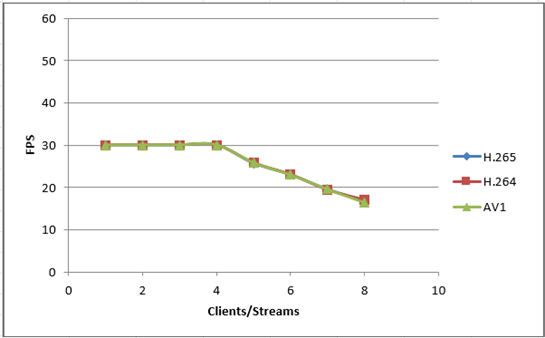
HDTV 1080P (1920x1080), max 30 fps, standard configuration
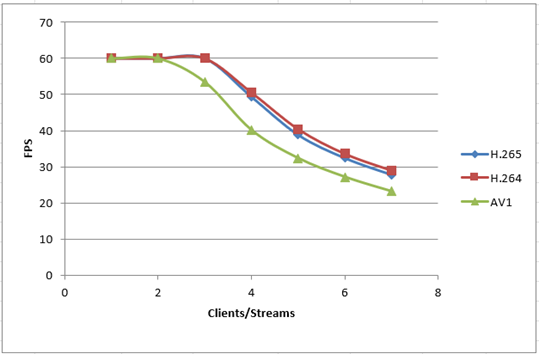
HDTV 1080P (1920x1080), max 60 fps, standard configuration
Result analysis
If the image scene, compression level, and compression method are kept constant, an increase in resolution will decrease the number of full frame rate streams or cause the frame rate per stream to decrease. When the resolution is increased, for example from HDTV 1080P to 4K, the frame rate will drop as the number of streams is increased.
As the first four result diagrams (extended configuration) show, ARTPEC-9 can deliver one of the following.
one AV1/H.264/H.265 stream in 4K at 60 fps, or
two or three simultaneous AV1/H.264/H.265 streams in 4K at 30 fps, or
four simultaneous AV1/H.264/H.265 streams in HDTV 1080P at 60 fps, or
eight simultaneous AV1/H.264/H.265 streams in HDTV 1080P at 30 fps.
Comparing the performance of AV1 to H.264/H.265 in terms of stream count and frame rate, there is a slight difference. Despite its higher encoding complexity, AV1's performance is marginally lower due to the increased computational demands.
The processing power (PCPU), or total throughput, of ARTPEC-9 can be calculated using the formula: PCPU = Frame rate x Image resolution x Number of unique streams.
Using the formula on our test results, we see that the processing power, or total throughput, of ARTPEC-9 can reach:
PCPU=540 megapixels/s for the extended configuration
PCPU=425 megapixels/s for the standard configuration