
Axis Zipstream technology
Summary
Axis Zipstream technology makes it possible to increase forensic usability by using full frame rate and higher resolution while reducing storage costs. The intelligent compression method ensures that important image details are preserved in the video stream, while unnecessary data is omitted.
Most networked video surveillance systems today are limited by bandwidth and storage for the recorded video. Zipstream is a radically improved, standard-compatible video encoder implementation that lowers bandwidth and storage requirements by an average of 50% or more when compared to standard compression. Important details and motion are preserved at high video quality, while the Axis-unique compression enhancement can filter out the rest of the image information to make optimal use of the available bandwidth.
Zipstream consists of a collection of algorithms that analyze the video stream in real time:
Dynamic ROI (regions of interest) – identifies regions of interest based on objects, people, or motion in the scene, and applies the correct level of compression from a forensic perspective.
Dynamic GOP (group of pictures) – makes the camera send bandwidth-intense I-frames less frequently when there is no motion in the scene.
Dynamic FPS (frames per second) – reduces the bitrate when there is little or no motion in the scene. The camera captures and analyzes video at full frame rate, but unnecessary frames are removed.
Zipstream is continuously improved and enhanced. Since its introduction to the market in 2015, Zipstream has been enhanced with PTZ camera functionality, support for 4K Ultra HD, thermal, and 360-degree-panoramic cameras, dynamic FPS limitation, and dynamic FPS frame skipping. More recently, two Zipstream profiles have been added, which enable more advanced video compression techniques but also make Zipstream easier and more intuitive to use. The storage profile optimizes the video stream for storage, while the network load-balancing profile optimizes it for high-load network scenarios.
Zipstream has AV1 support in cameras based on the system-on-chip ARTPEC-9. These cameras have support for all three video codecs in parallel (AV1, H.265, and H.264) to enable flexible migration over an extended transition period. ARTPEC-9 can deliver multiple streams simultaneously up to the maximum performance limit of the chip.
Introduction
Camera technologies such as sensors, optics, and embedded image processing have evolved rapidly over the last decade. This enables video with higher resolution, frame rate, and dynamic range, where more scene details can be captured. As a result, video evidence and forensic analysis is more reliable today, but only when it is possible to retrieve the video from the right place, at the right time, and with the right quality. And due to the higher bitrate, the requirements on storage and bandwidth have increased.
Axis Zipstream technology is a standard-compatible video encoder implementation that is radically more efficient than standard encoders. It is optimized for video surveillance and lowers bandwidth and storage requirements by an average of 50% or more. Zipstream consists of a collection of intelligent compression algorithms that make sure that important details in the image maintain full resolution in the video stream, while unnecessary data is omitted. Zipstream is continuously improved with additional dynamic features.
Video encoding standards
Surveillance video needs to be processed before it can be efficiently stored. This is done using video compression algorithms that encode video data by reducing and removing redundant information. The algorithms locate regions in the video that have already been transferred, so that redundant sending of the next image frame can be avoided. The algorithms also identify places in the video where details can be omitted without reducing the visual quality.
International standards for video encoding, such as H.264, AV1, and H.265, group compression methods that function well together, to form video stream syntaxes for storing, sharing, and viewing video.
H.264 is the most used video compression standard today. It is efficient enough to reduce several days of surveillance video to fit on a single SD card. H.264 is also known as Advanced Video Coding (AVC) or MPEG-4 Part 10. It was jointly developed by standardization organizations in the IT and telecommunications industries: ISO/IEC Moving Picture Experts Group and ITU-T Video Coding Experts Group.
AV1 is a modern and open-source-friendly standard because it is license-free to Alliance for Open Media (AOM). AV1 is predicted to play a significant role in future security surveillance where more solutions need cloud integration.
H.265 was meant to replace H.264, but licensing issues made it hard for companies to use it widely. As a result, it has been difficult for hardware vendors to preinstall client decoders, and also too complex for end users to implement them on their own. H.265 is also known as High Efficiency Video Coding (HEVC) or ITU-T H.265. It was jointly developed by ISO/IEC Moving Picture Experts Group and ITU-T Video Coding Experts Group.
The video encoder standards don’t stipulate the actual video compression method; only the syntax and the method to perform playback is standardized. This enables improved video encoding solutions to be created while keeping the file format for interoperability (decoder compatibility).
Zipstream is a more effective implementation of a native H.264/AV1/H.265 video encoder for surveillance applications. It includes various methods, unique to surveillance, that enable networked cameras to produce video at significantly lower bitrates.
How does Zipstream work?
Axis Zipstream technology is a collection of algorithms that lets the camera analyze the video stream in real-time. Axis unique method for compression preserves motion and details of interest with the given image quality, whereas other areas are filtered and compressed more aggressively for optimal use of the available bandwidth.
Zipstream is in no way a replacement for H.265 or AV1. Zipstream is a video encoder enhancement that can be applied to many video compression standards, including H.264, AV1, or H.265, with minor adaptations.
Bitrate reduction algorithms
Zipstream consists of three algorithms for reducing the bitrate.
Dynamic ROI (regions of interest)
Through real-time analysis, the dynamic ROI identifies regions of interest based on objects, people, or motion in the scene and applies the correct level of compression from a forensic perspective. This process is performed for all image content, resulting in a totally flexible dynamic ROI. The ROI will automatically expand, shrink, change shape, split, merge, disappear, and reappear depending on content, for the benefit of tuning the instant bandwidth.
Since it is unknown in which parts of the image relevant information may appear, Zipstream prepares the system for unexpected events. This dynamic automatic ROI is much more convenient than traditional ROI implementations in which the region is set manually.
Dynamic GOP (group of pictures)
With dynamic GOP, the camera will send bandwidth-intensive I-frames less frequently when there is no motion in the scene. Video from typical surveillance scenes with limited motion can be compressed to an extremely low bitrate with no loss of detail. This algorithm performs a real-time adaptation of the GOP length on the compressed video, according to the amount of motion.
Not all clients or VMS may support smooth playback of video with this algorithm enabled, even though the compressed video stream conforms to the H.264 standard.
Dynamic FPS (frames per second)
The dynamic FPS reduces the bitrate by avoiding unnecessary encoding of video frames, which is done by omitting them from the stream. A static surveillance scene will be encoded at a radically reduced frame rate, even though the camera is capturing and analyzing video at the full frame rate. As scene motion is used as a control variable, a small moving object far away might not render at full frame rate. Objects approaching the camera increase the frame rate to capture every important detail. The number of delivered frames per second is restricted automatically by the camera, and this saves a substantial amount of data in many scenes.
Dynamic FPS has a limitation parameter where you can set the minimum allowed dynamic frame rate. A dynamic frame rate between the stream fps and the configured minimum fps will then be selected, enabling use with supporting systems with minimum-fps requirements, as well as with systems that require a higher fps.
Some video management systems might not support smooth playback of video with dynamic frame rate, even though the compressed video stream conforms to the H.264/AV1/H.265 video standards. In these cases, disabling the frame skipping (setting the dynamic FPS frame skipping mode to “empty”) makes it possible to still use dynamic FPS. The video frame rate will vary while the full stream frame rate is maintained. Disabled frame skipping works as a compatibility mode that allows all users to benefit from the dynamic FPS, even though the bitrate saving will be smaller than when frame skipping is enabled.
Legal requirements can prevent the use of dynamic frame rate in some surveillance cases. By choosing the correct minimum-fps value, the dynamic FPS algorithm can still be used.
The storage profile
Most Axis video products are used to record video for later viewing, rather than live viewing. The storage profile in Zipstream was designed to accommodate this primary use by minimizing the bitrate while maximizing the evidence for video storage. Using the preconfigured profile, the camera automatically enables the specific Zipstream algorithm that is most suitable for that type of camera, and uses more advanced video encoding tools. The profile varies across different cameras depending on their capabilities, and the result can vary between camera types.
The storage profile utilizes an alternative GOP structure compared with regular Zipstream, with up to two bi-directional frames (B-frames) per P-frame, that saves bitrate by being able to use future information in the video encoding. The number of B-frames is dynamically changed, as there are situations where using B-frames would increase the bitrate. Beyond the bitrate reduction, the B-frames will introduce a latency impact of 1/fps per B-frame. This means that for, for example, a 25 fps video, an extra 80 ms of latency will be added to the video when using storage optimized video. Note that H.264 Baseline profile does not support B-frames and will be overridden to H.264 High profile if the storage profile is used.
Selecting the storage profile (“Optimize for storage”) enables the alternative dynamic GOP algorithm and B-frames, but doesn’t change any other Zipstream settings.
If the camera is overloaded by too many stream requests, storage profile videos will be prioritized. This is to ensure the preservation of their evidence value.
The network load-balancing profile
Optimized for challenging network conditions where I-frame spikes can be problematic, this profile is highly relevant for WiFi, 4G, 5G, LTE, or other wireless networks. Settings are automatically optimized for high-load network scenarios to minimize bitrate spikes. I-frames can be configured to be smaller or even replaced by gradual decode refresh P-frames.
I-frames are reduced in size by shifting data to adjacent P-frames through dynamic compression adjustments, resulting in slightly larger P-frames. The gradual decode refresh technique distributes the I-frame update by spreading I-blocks (intra blocks) across several subsequent P-frames, rather than sending them all at once in a single, large I-frame.
You can control I-frame behavior through the optional parameter Gradual decode refresh.
Bitrate reduction expectations
Zipstream uses real-time scene information to reduce the average bitrate. You can estimate the total bitrate reduction by evaluating the bitrate savings for each algorithm independently, and combine the results. The table shows expected bitrate reduction for video with H.264 compression.
| Zipstream algorithm | Bitrate reduction |
Dynamic ROI | 10-50% (depending on Zipstream strength parameter, scene motion, and scene content) |
Dynamic GOP | 0-50% (depending on scene motion) |
Dynamic FPS | 0-50% (depending on scene motion) |
Bitrate reduction graphs with dynamic GOP
The illustration plots the instantaneous bitrates for one video with Zipstream off (1), low (2), and high (3). Dynamic ROI and dynamic GOP are on, while dynamic FPS is off. Four scenarios (A, B, C, D) with varying types of motion are marked, in which the Zipstream algorithms have different conditions to work with.
- Zipstream off.
- Zipstream strength: low. The bitrate (yellow) is visibly reduced.
- Zipstream strength: high. The bitrate (yellow) is even more reduced.
All the streams are variable bitrate (VBR) streams with P-frames (GOP length) set to 32. Each I-frame update is clearly visible as a spike in bitrate.
A-D in the illustration highlights time intervals in the video where varying types of motion occur. Zipstream works differently depending on the conditions in each time interval.
A. Time interval with slight and brief motion in the video. The dynamic ROI algorithm detects where in the scene there is motion so that less compression can be applied in this region of interest.
B. Time interval with more pronounced and long-lasting motion. This video sequence will require higher bitrate. There will still be some bitrate reduction because non-prioritized information can be omitted by help of the dynamic ROI algorithm.
C. Time interval without motion. The dynamic GOP algorithm can here allow a higher number of P-frames, and thereby prevent unnecessary I-frame updates.
D. Time interval with slight but long-lasting motion. The motion is recorded as expected and the number of P-frames goes back to the set value.
Bitrate reduction graphs with dynamic FPS
The graph shows instantaneous bitrate for a video with Zipstream strength: high. Dynamic ROI, dynamic GOP, and dynamic FPS are on. Four scenarios (E, F, G, H) are marked and frame rates are noted.
E. With motion in the scene, the camera produces data at 30 fps.
F. When the motion decreases, the frame rate drops substantially. The bitrate decreases when the frame rate is reduced, as less data is transferred.
G. During a period with no motion in a completely static scene, the frame rate drops to almost zero between I-frames. Sparsely spread I-frame updates are the only bitrate source.
H. When motion is again detected, the camera immediately returns to 30 fps.
Example measurements in typical scenes
This chapter presents measured bitrate reduction for constant recording in different types of surveillance scenes, with regular Zipstream and with the storage profile.
Bitrate reduction with Zipstream
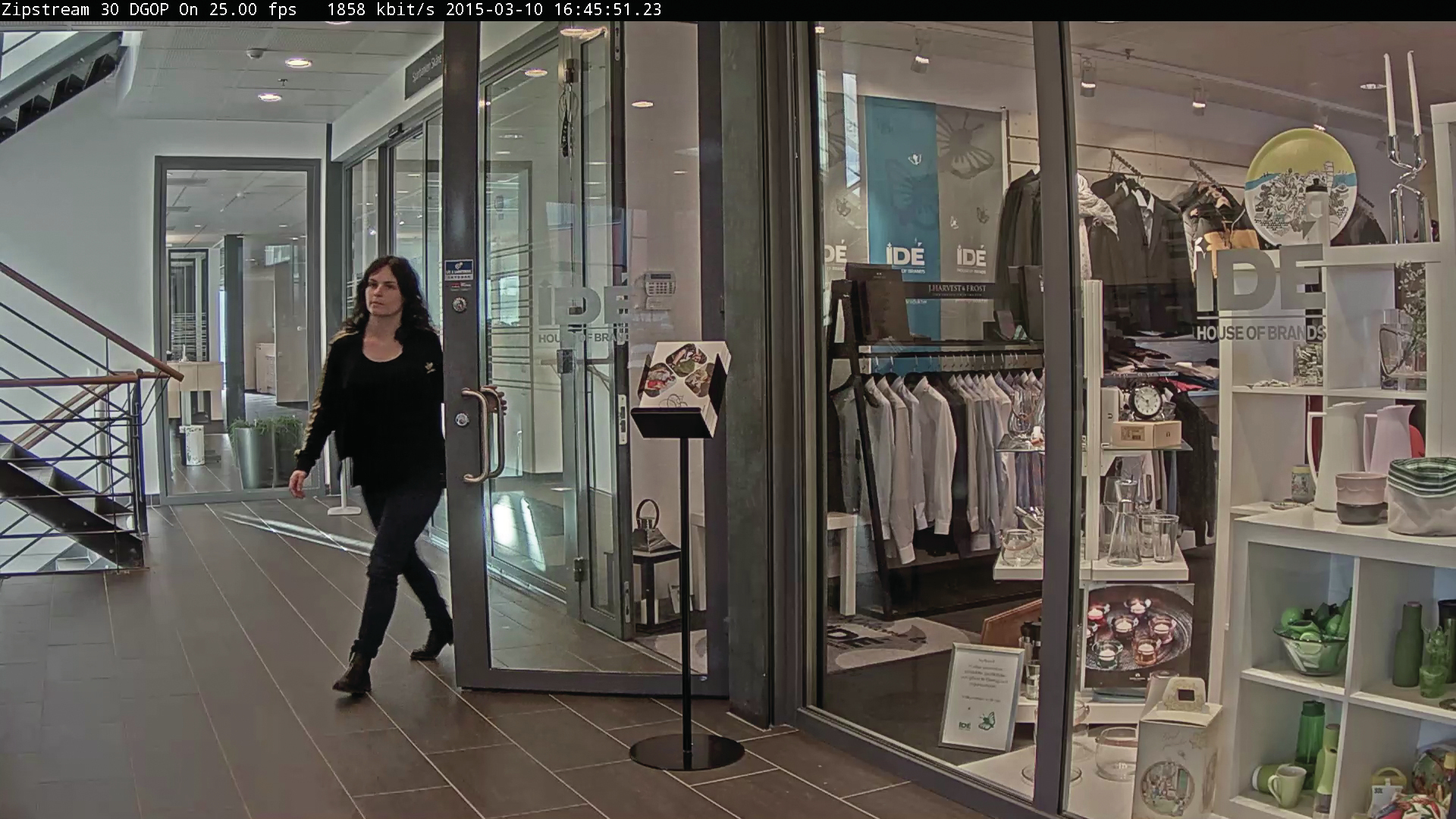
Total bitrate reduction: 25%.
Zipstream strength: low. Dynamic GOP: off. Dynamic FPS: off.

Total bitrate reduction: 50%.
Zipstream strength: high. Dynamic GOP: on. Dynamic FPS: off.

Total bitrate reduction: 90%.
Zipstream strength: high. Dynamic GOP: on. Dynamic FPS: off.

Total bitrate reduction: 73%.
Zipstream strength: extreme. Dynamic GOP: on. Dynamic FPS: on.
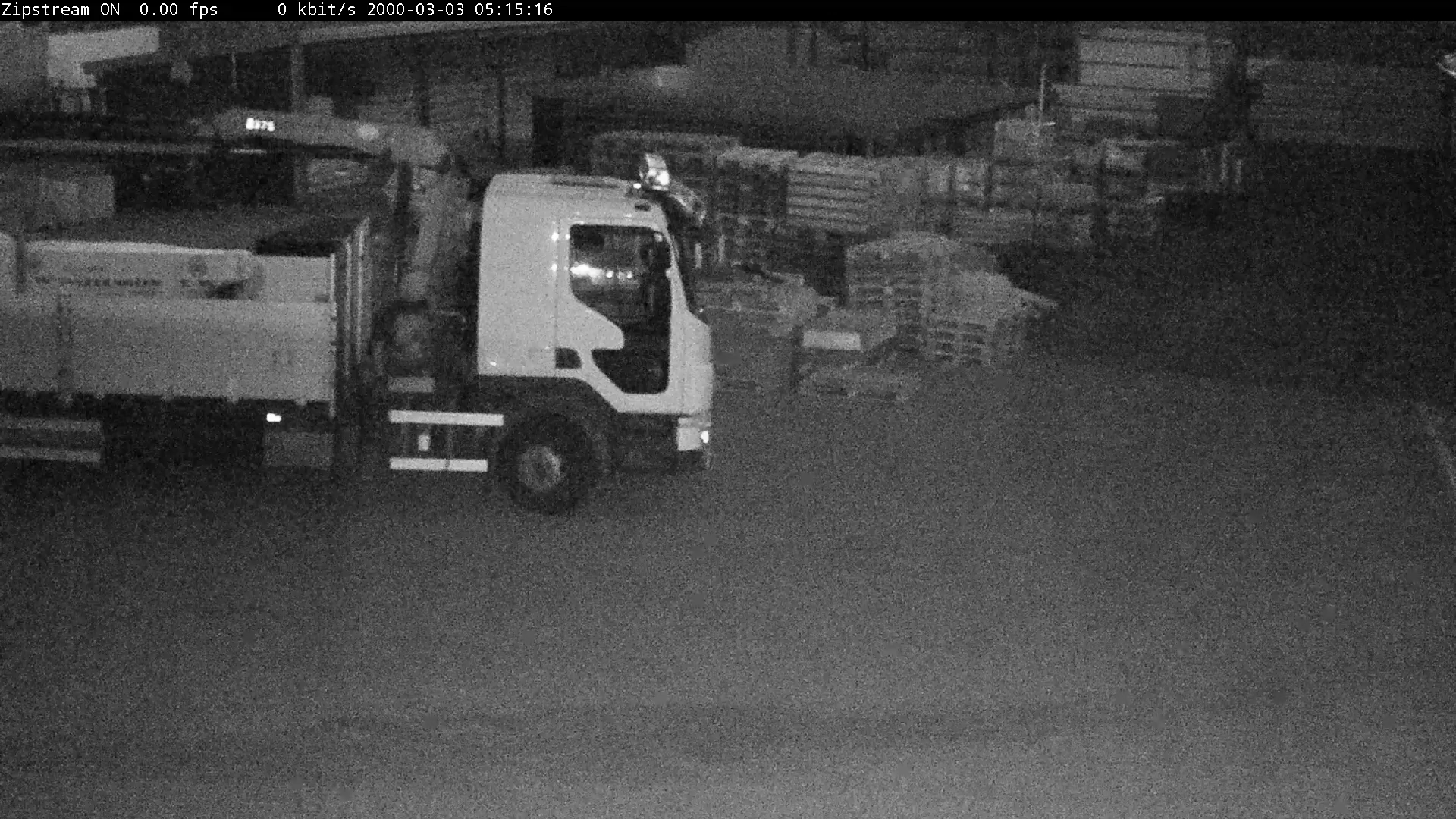
Total bitrate reduction: 99.7%.
Zipstream strength: extreme. Dynamic GOP: on. Dynamic FPS: on.

Total bitrate reduction: 85%.
Zipstream strength: extreme. Dynamic GOP: on. Dynamic FPS: off.
Additional bitrate reduction with the storage profile
The Zipstream storage profile can save substantial storage compared with the classic Zipstream setting. Even for scenes with a lot of motion, the storage profile can further reduce the bitrate because different compression tools are used. Dynamic GOP (and dynamic FPS) doesn’t matter much in these scenes because there is motion all the time. If the motion calmed down, dynamic GOP would provide additional savings.

Additional bitrate reduction*: 40%
* compared with classic, default Zipstream (Strength: low. Dynamic GOP: off. Dynamic FPS: off.)

Additional bitrate reduction*: 33%
* compared with classic, default Zipstream (Strength: low. Dynamic GOP: off. Dynamic FPS: off.)

Additional bitrate reduction*: 32%
* compared with classic Zipstream (Strength: extreme. Dynamic GOP: on. Dynamic FPS: on.)
Zipstream for specific cameras and codecs
PTZ cameras
The Zipstream algorithm for PTZ cameras enables bitrate reduction even when the camera is panning, tilting, and zooming. The algorithm reduces the bitrate in real-time by automatically updating the dynamic ROI that preserves important image details. To further improve PTZ usability and reduce system requirements, a dynamic bitrate controller has been added to avoid bandwidth peaks caused by camera movements. It does this by reducing the general video quality while preserving reference points that the operator can use for navigation, in order to maintain the orientation and the tracking of important objects during rapid camera movements.
The storage profile and the network load-balancing profile work with PTZ cameras but can introduce some latency in the live view mode.
Enhanced dynamic ROI
In a PTZ camera, the dynamic ROI algorithm compensates for both scene motion and camera motion simultaneously. During camera movements, some areas of the video are identified as more important and prioritized, while other areas are compressed more to reduce bandwidth usage. This part of the algorithm reduces the average bandwidth and storage, while preserving forensic details.
Dynamic bitrate controller
Even with the enhanced dynamic ROI enabled, a panning, tilting, and zooming camera requires more bandwidth than a fixed camera. This is because new information is captured at a very high rate during the camera’s rapid repositioning. However, since motion blur reduces the video quality anyway, a dynamic bitrate controller algorithm can be used to automatically reduce the bitrate and avoid bandwidth peaks triggered by camera motion. A PTZ camera typically performs panning, tilting, and zooming within a fraction of a second. As soon as the camera stops again, the bitrate controller immediately restores the bitrate to deliver optimal video quality.
The dynamic bitrate controller reduces the requirements on the entire system, such as transmission equipment (switches and routers), storage (recording servers and disk size), and viewing devices (computers and decoders). This means that remote PTZ cameras can be operated using a less complex transmission channel, while still preserving their benefits and flexibility.
Bitrate reduction graphs for PTZ camera
The illustration plots the instantaneous bitrate for a video, without and with Zipstream. Four motion scenarios (J, K, L, M) with varying types of motion are marked, in which Zipstream has different conditions to work with.
- Zipstream is off.
- Zipstream for PTZ is on. The bitrate (yellow) is visibly reduced.
Both streams are variable bitrate (VBR) streams with P-frames (GOP length) set to 32.
J, K, L, M in the illustration highlights time intervals in the video where varying types of motion occur. Zipstream works differently depending on the conditions in each time interval.
J. In this time interval, the camera is initially stationary in its overview position and there is no motion in the scene. Zipstream is saving considerable storage. Then, slight motion in the scene is detected.
K. The camera pans and zooms to capture high-resolution footage of the motion in the scene. The camera’s rapid repositioning increases the bitrate but the dynamic bitrate controller can substantially reduce the increase.
L. The camera captures high quality video of the motion in the scene. Zipstream automatically reduces the bitrate in non-prioritized areas of the scene.
M. When the motion has subsided, the camera pans and tilts to cover a larger area. The bitrate and video quality automatically adjust to these movements.
4K Ultra HD, 8K, and multi-megapixel cameras
Zipstream can also be used in the cameras with the highest need for bitrate reductions: 4K, 8K, and multi-megapixel cameras. While these high-resolution cameras are extremely efficient at capturing forensic details, they have been expensive to use due to the high storage requirements. Today, Zipstream can analyze a 4K stream in real time to reduce transfer and storage. An 8K camera is built with dual ARTPEC chips for sufficient performance.
360-degree panoramic cameras
Panoramic cameras are fixed cameras that provide wide-area coverage – from 180º to 360º with a single, multisensor camera. They are often used in surveillance, especially for monitoring activity and detecting incidents in large areas, for tracking the flow of people, and for improving area management. New panoramic camera models combine wide-area coverage with multi-megapixel resolution, and provide de-warped images with high level of detail. Zipstream supports these cameras for all panoramic view options and can significantly reduce storage requirements.
AV1 support
In cameras with the system-on-chip ARTPEC-9, Zipstream supports hardware-accelerated AV1 video encoding based on the AV1 format released by AOM. Even though it is completely new for the security use case, AV1 is the video encoder expected to eventually replace H.264 in popularity thanks to low bitrate, new features, and wide client decoder support.
AV1 is likely to become the preferred video encoder standard for cloud solutions, and also prove valuable for on-prem solutions that require cloud integration or remote video access for mobile users. With its rapidly expanding ecosystem, AV1 is optimized for low footprint but can also scale to custom hardware when offloading is needed.
H.265 support
Zipstream supports the global video encoding standard H.265. However, H.265 was developed for noiseless broadcast video and is not yet fully adapted for video surveillance, where difficult lighting conditions are common. Also, H.265 ecosystem support is still limited and lacking real progress.
Zipstream for H.265 is delivered with the same tools and benefits as the initial H.264 version, but with even lower bitrates for complex scenes. H.265 is very efficient for encoding moving objects with a lot of detail, but in some cases Zipstream with H.264 could still deliver lower bandwidth.
Zipstream can, depending on camera SoC, provide H.264, H.265, and AV1 support in parallel in the same camera, without requiring reconfiguration or complicated system setups. True multi-streaming with selectable codec and configurations per stream enables all these types of video to be transmitted or stored, for maximum flexibility. This multi-codec approach is central for making the transition period between standards as smooth as possible.
Storage savings with Zipstream
Camera surveillance systems require the bitrate to be reduced, while at the same time maintaining the image quality. Even the slightest deviation in a scene must be detected, and it must be possible to perform advanced forensic work after an incident. Zipstream enables continuous recordings due to the low bitrate used for static scenes.
For AXIS Camera Station Edge, an even lower bitrate is desirable, because system cost and ease-of-installation are priorities. The aim is to save video of sufficient quality on cost-efficient edge storage. However, video quality needs to be reduced in a controlled manner, in order to easily find and understand the course of events. Zipstream reduces the number of missed triggers by allowing longer recording segments for each motion-triggered event without generating excessive data.
Zipstream is relevant for users who wish to reduce the cost of storage or network loads. In any video surveillance system, reducing storage needs directly results in a lower total cost, independent of system size or storage solution. With Zipstream, less storage is needed per recorded minute. This enables increased retention time, resolution, or number of cameras, without having to increase the storage space.
Cameras that use Zipstream and AV1 are very attractive for cloud solutions, which require efficient, low-bitrate video encoding. Because AV1 is natively supported by many mobile devices, computers, and web browsers without needing plugins, Zipstream with AV1 integrate seamlessly with cloud provider toolboxes. Additionally, AV1 can be used with WebRTC for realtime, low latency, high resolution video streaming with significantly lower bitrate compared with traditional H.264 encoding.
Bitrate control and forensic details
Axis recommends using networked video with a variable bitrate (VBR), where the quality adapts to the scene content in real time. Using a constant bitrate (CBR) as a storage reduction strategy is not recommended, as cameras delivering CBR video may have to discard important forensic details in critical situations due to the bitrate limit.
Zipstream makes it possible for the system installer to continue using VBR, with or without a limit, for optimal video quality while reducing the storage requirements. In this way the system can keep delivering high quality video. Important forensic details such as faces, tattoos, and clothing patterns are isolated and preserved, while irrelevant parts such as white walls, lawns, and vegetation are smoothed out.
If a storage solution or the network requires an absolute upper bandwidth limit, Zipstream is compatible with MBR, a method that protects the system from temporary bandwidth spikes.
Zipstream management
Many VMS solutions can request Zipstream automatically. You can also activate Zipstream in the camera web interface or through AXIS Device Manager.
You can configure the different algorithms individually with the classic profile, or use one of the other profiles.
Classic profile: The default profile, which lets you control major parts of the Zipstream algorithm individually.
Storage profile: Configures Zipstream so that the video is optimized for storage and later access. If you use a VMS to request a video stream, you can get a storage optimized stream by adding a stream profile parameter. If VMS integration is not available, you can use the camera’s web interface to force all streams to use storage profile (select “Optimize for storage” in the Zipstream settings).
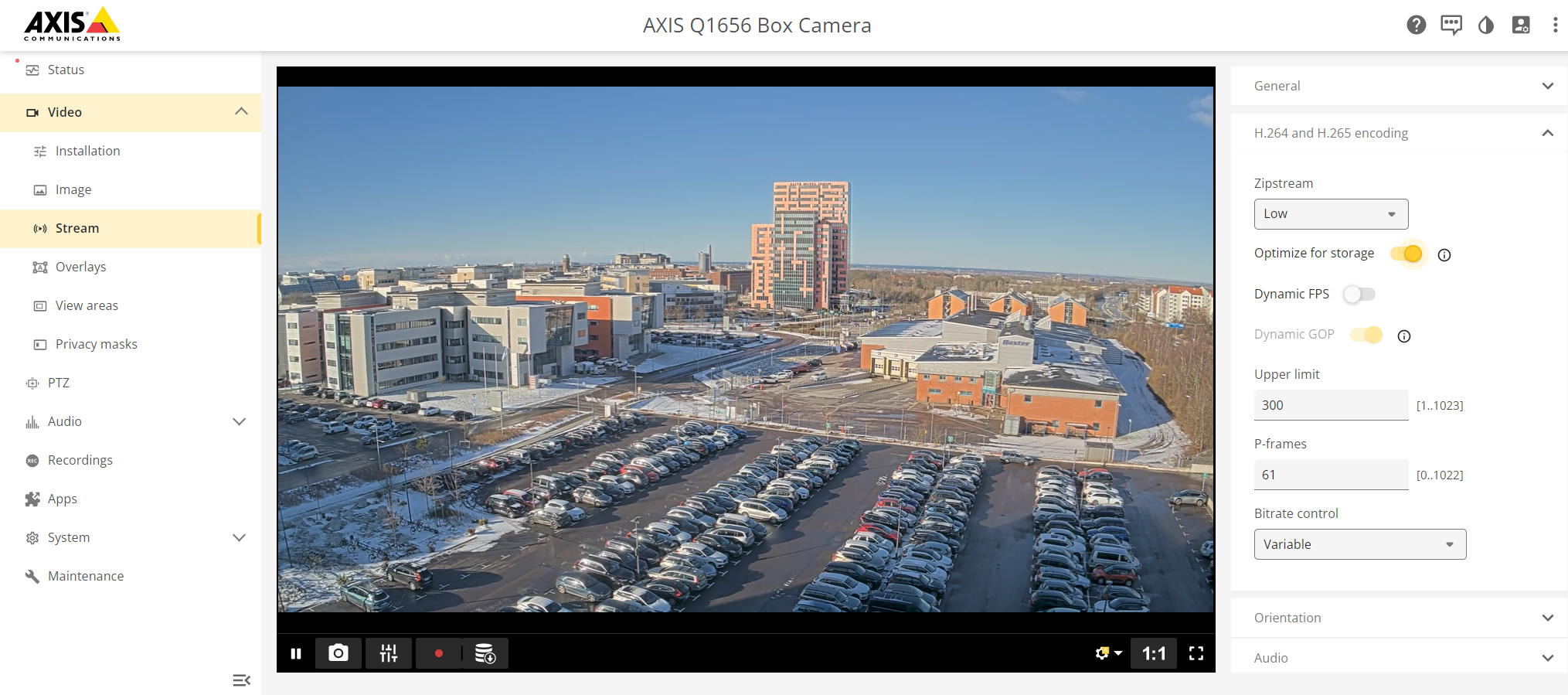
Network load-balancing profile: Configures Zipstream so that the video is optimized for high-load networks. The optional parameter Gradual decode refresh controls I-frame behavior with the following values:
Auto: The video framework manages this parameter internally. This is the default setting.
Low: Gradual decode refresh is disabled, but I-frames are more heavily compressed than in other profiles.
Balanced: Most updates use gradual decode refresh by distributing intra blocks into P-frames. Some compressed I-frames are still utilized to maintain decoding compatibility during video playback.
Extreme: All updates are performed via gradual decode refresh. Aside from the initial (heavily compressed) I-frame, all subsequent refreshes are handled through intra blocks.
Zipstream settings
Zipstream adapts the compressed video stream based on scene motion, scene content, ambient light level, and settings that you as a user can control. This includes specific Zipstream settings and general video stream settings.
Zipstream settings:
Strength: Various levels from Off to Extreme. A higher Zipstream strength minimizes storage but can give visible effects in some scenes.
Off: No bitrate reduction
Low: No visible quality degradation in most scenes. This is the default option and it can be used in all types of scenes to reduce the bitrate.
Medium: Visible effect in some scenes through less noise and a slightly lower level of detail in regions of lower interest, for example where there’s no movement.
High: Visible effects in some scenes through less noise and a lower level of detail in regions of lower interest, for example, where there’s no movement. This strength is recommended for cloud-connected devices and devices that use local storage.
Higher: Visible effects in more scenes through less noise and a lower level of detail in regions of lower interest, for example, where there’s no movement.
Extreme: Visible effect in most scenes. The bitrate is optimized for smallest possible storage.
Dynamic GOP: On or off. If on, you can set an upper limit to the allowed GOP length.
Dynamic FPS: On or off. If on, you can set a lower limit to the allowed frame rate.
Dynamic FPS frame skip mode: Empty or dropped.
Dynamic GOP and dynamic FPS can be used simultaneously for increased bitrate reduction. If the VMS or other client software can’t handle the varying GOP length, set a shorter maximum GOP length or turn off dynamic GOP. If the software can’t handle the varying frame rate, set a minimum allowed dynamic FPS or turn off the dynamic FPS frame skipping.
By default, cameras that support Zipstream are configured with strength Low and dynamic GOP and dynamic FPS both off. The default setting is compatible with all existing software applications, while still reducing the bitrate. All strength parameter settings are also compatible with all existing applications, while still reducing the bitrate.
General video stream settings:
Compression. Even with Zipstream activated, the camera’s general compression parameter still controls the degree of compression applied to important forensic details. This parameter is usually set to 30, and that’s also recommended when Zipstream is active.
Bitrate control. The bitrate controller built into the encoder can be combined with Zipstream to enforce a maximum bitrate (MBR) limit. MBR is a variable bitrate (VBR) configuration that includes an upper limit to protect the system from temporary bandwidth spikes. However, the MBR limit must be sufficient to capture the details of moving objects in the scene to enable the full potential of Zipstream and VBR. To limit the bitrate for increased storage time, cloud-connected cameras or cameras with edge storage should be configured with the Zipstream strength parameter set to High and dynamic GOP enabled. This setting is suitable to combine with motion detection triggering and/or MBR systems where the bitrate is allowed to adapt to changes in complexity.
For more information about Zipstream settings and parameters, see Axis developer documentation:
Acronyms and abbreviations
AOM: Alliance for Open Media
AV1: AOMedia Video 1
CBR: Constant bitrate
FPS: Frames per second
GOP: Group of pictures
HEVC: High Efficiency Video Coding
IEC: International Electrotechnical Commission
ISO: International Organization for Standardization
ITU: International Telecommunication Union
ITU-T: ITU Telecommunication Standardization Sector
MBR: Maximum bitrate
MPEG: Moving Picture Experts Group
PTZ: Pan-tilt-zoom
ROI: Region of interest
SoC: System on chip
VBR: Variable bitrate
VCEG: Video Coding Experts Group or Visual Coding Experts Group
VMS: Video management system