
Directional audio detection
Introduction
Traditional security cameras rely primarily on video for event detection. However, audio can provide crucial context, especially for events occurring outside the camera’s field of view.
The feature directional audio detection is an example of where audio can really contribute. It detects sudden, loud sounds such as gunshots, glass breaking, or screams. When a sound is detected, the feature calculates where the sound is coming from. This can be used to trigger recordings, alert operators, and direct a compatible PTZ camera toward the sound source.
This white paper explains the technology and its operational principles, deployment considerations, and limitations.
Detecting audio incidents
Directional audio detection continuously monitors the environment using the camera’s multiple acoustic sensors. The system identifies sounds that rise rapidly in amplitude and exceed a configurable trigger threshold. When a sound is detected, the system calculates the pan angle and, if possible, also the tilt angle to the source. The resulting information is sent as a VAPIX event to the PTZ camera, which can pan accordingly to view the audio source.
Directional audio detection is integrated in AXIS Q6300-E Network Camera. All PTZ cameras compatible with AXIS Q6300-E are compatible with directional audio detection.
Initial setup
Installation options
You can mount AXIS Q6300-E on a flat wall, an outer corner, a pole, or a mast. For optimal directional audio detection performance, pole or outer corner installation is generally the best option.
As specified in the installation guide, you must install AXIS Q6300-E with its front facing forward. This is indicated on the camera by a groove on the top and an arrow (pan-zero mark) on the outer rim, as shown in the camera’s installation guide.
Some PTZ cameras require manual configuration. In that case, the setup assistant will guide you.
Activate directional audio detection
The feature is off by default. To use it you must activate it in the camera’s web interface. If you additionally want the feature to be able to redirect the PTZ camera, you must activate that option as well. You can find the settings in the camera’s web interface under Analytics > AXIS Audio Analytics > Directional audio detection.
Calibrate the pan angle
AXIS Q6300-E and the PTZ camera can have different pan angle references. Some PTZ models are precalibrated, but with some you must calibrate the pan angle before you can use directional audio detection. In that case, the setup assistant will guide you through the calibration.
Adjust the tilt angle preset value
When a sound is detected, directional audio detection calculates the pan and tilt angles to the audio source. While the pan angle is always calculated, the tilt angle is not always possible to determine. This typically occurs when the sound is perceived from the horizontal plane rather than from below. If no tilt angle is calculated, directional audio detection uses a preset value. You can adjust this value under the PTZ tab in the camera’s web interface.
Operation
The web interface
In the camera’s web interface you can find the settings for directional audio detection under Analytics > AXIS Audio Analytics > Directional audio detection. You can also see, for example, a quad view from the overview cameras. When a sound is detected you can see which area it came from, by a yellow rectangle around the corresponding camera view.
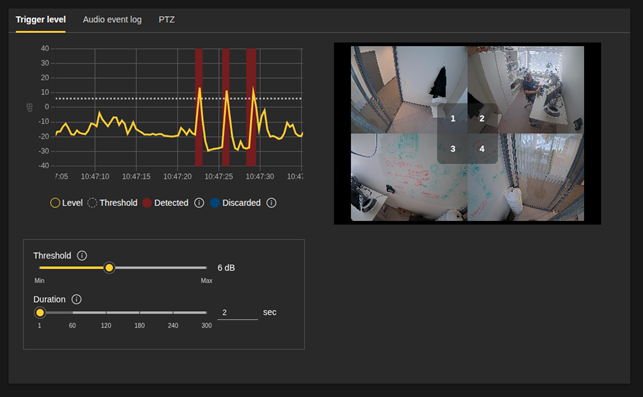
In the web interface you can also control the settings for threshold and duration.
Threshold. Specifies how many decibels louder than the background a sound must be. The higher the threshold, the louder or quicker the sound needs to be to trigger directional audio detection.
Duration. Defines how long new audio events will be ignored after the first audio event.
Audio event log
Audio events are logged and can be exported to a csv file.
Action rule triggers
Directional audio detection can be used to trigger automatic actions, such as starting a recording, in a VMS. Several triggers are available.
Audio detected. This trigger is activated for every audio event. It can be used to, for example, start a recording, create a bookmark, or log a detection in a VMS for an operator to easily find and review it.
Audio detected in the view of camera “X”. This trigger is activated if the pan and tilt angles of the detected sound correspond to one of the fixed cameras. The trigger can be used to display an overlay on the relevant camera view when a sound is detected, making it easier to identify the audio source.
Audio detected outside of any camera view. This trigger is activated if the detected sound is not within any of the fixed camera views.
Precedence over autopilot feature
Autopilot is a feature that monitors an area of interest from the multidirectional camera and tracks and categorizes persons, vehicles, or other moving objects by use of the PTZ camera.
Directional audio detection takes precedence over autopilot. This means that if autopilot was actively tracking an object when directional audio detection was triggered, the tracking is interrupted and the PTZ camera is directed toward the audio source. After a brief pause, autopilot resumes tracking from the new position and follows the object (if visible) that produced the sound.
Detection range
The detection performance depends on circumstances such as, obviously, how loud and close the audio source is, but also the ambient sound level and other environmental factors.
Adaptable sensitivity
You can customize detection sensitivity by adapting the threshold. It defines how much louder than the ambient noise level a sound must be to trigger directional audio detection.
Physical obstacles
Buildings or large objects can reflect or block sound. This can make the detection range shorter than expected for sounds coming from certain directions.
Weather conditions
Wind and rain can affect sound propagation and perception.
Filtering out rain noise
Heavy rain can be noisy. However, to trigger directional audio detection, the sound’s amplitude must increase rapidly and exceed the background noise level plus the set threshold. Since rain noise contributes to the background noise, it is filtered out and generally doesn’t trigger directional audio detection.
Filtering out wind noise
Wind noise occurs when wind encounters fixed objects such as buildings, poles, and wires. This can create humming or other constant sounds. The camera itself can also contribute to wind noise when exposed to strong winds or wind gusts. Wind gusts are typically short, lasting only a few seconds, but can be two to three times stronger than the average wind and cause temporary noise. However, wind noise is perceived differently by the camera’s acoustic sensors and is therefore discarded by directional audio detection.
Wind effects on sound propagation
Strong winds can have an impact on the detection range because they influence sound propagation.
Sounds that travel in windy areas can be perceived as louder or quieter depending on how they’re affected by the wind. In general, winds close to the ground move slower than winds higher up in the air. The speed difference creates a wind gradient that can effectively redirect sound waves, so that sounds traveling downwind tend to bend downwards, while sounds traveling upwind will bend upwards. This means that a person standing downwind (and on the ground) from an audio source, will hear a louder sound than a person standing upwind. The effect increases over longer distances and with higher wind speeds.
Privacy and integrity
Directional audio detection is designed with privacy and data protection as fundamental principles.
Directional audio detection uses acoustic sensors to perform volume measurement and basic sound triangulation. The system monitors sound levels but is technically unable to record or stream conversations or speech, recognize words, language, or voices, or stream audio content to any external systems.
All audio processing occurs entirely within the device itself, and no audio data ever leaves the camera. When the configured sound threshold is exceeded, the system generates and transmits metadata events to the VMS. These events contain timestamp of detection, sound intensity level, and calculated coordinates for PTZ positioning. No audio content, recordings, or identifiable sound patterns are transmitted.